
Learn 01~8 min
Why dbt?
If you have written a SQL query, you have a starting point for dbt. This chapter follows a query into a shared project where its dependencies, tests and changes can be inspected.
The problem dbt solves
Every analytics team accumulates SQL: a view someone built a year ago, a script that has to run before another script, a "FINAL_v3" table nobody is sure is safe to drop. Even when each query is correct, maintaining the collection creates problems:
- Order of operations is manual. The summary table is only right if the reference data refreshed first, which is only right if the feed loaded. The person who knows the sequence runs it by hand. One step out of order and the numbers are wrong, with nothing to say so.
- Nobody knows what depends on what. Renaming a column means guessing what might break.
- Nothing is tested. A duplicate patient row appears, and the first you hear is a dashboard looking wrong.
- Everything is built end-to-end, every time. Each script contains its own source cleaning, lookups and business logic. The same column can end up cleaned differently in several outputs.
- Everyone works alone.Logic lives in personal worksheets and scripts, so five people hold five slightly different definitions of "current registration", there is no history of who changed what, and work leaves when its author does.
Each script may have been a reasonable answer to a real request. The difficulty grows as more people depend on the collection. A shared approach to dependencies, tests and review gives the team a way to manage that growth.
“Analytics doesn't have to be this way. In fact, the playbook for solving these problems already exists — on our software engineering teams.”
dbt (data build tool) addresses this with two ideas working together. First, a shared codebase: every transformation lives in one git repository, so there is one definition of each concept, full history of every change, and a review step before anything ships. Second, SQL models describe their results with SELECT statements whose dependencies dbt can read. The order of operations can then be derived from the code, computed fresh on every run, and never something a person has to remember.
What a dbt model actually is
The SQL models in this handbook are .sql files that each describe a result with a SELECT statement. SELECT chooses the columns and rows to return. This small example is from our project:
select
    person_id,
    pseudo_nhs_number as sk_patient_id
from {{ ref('raw_csds_bridging') }}
Notice what is missing: no CREATE TABLE, no DROP, no database or schema names. That is because you describe the result; dbt produces the object. When you run dbt run -s stg_csds_bridging, two things happen:
- Compile. dbt renders the template expressions. Here,
{{ ref('raw_csds_bridging') }}becomes the real database-qualified table name for whichever environment you are in (the DEV__ databases while developing, production after merge). - Run. dbt adds the database commands needed to create the chosen object, then executes it in Snowflake. For this model that means, roughly:
create or replace view DEV__STAGING.CSDS.STG_CSDS_BRIDGING as (
    select
        person_id,
        pseudo_nhs_number as sk_patient_id
    from DEV__STAGING.DBT_RAW.RAW_CSDS_BRIDGING
);
Whether the wrapper is create view or create table, and which database it lands in, comes from project configuration rather than this SELECT. This example creates a view, a saved query that reads its inputs when queried. A table stores the result produced at build time. That choice affects refresh behaviour; repeated builds are not a guarantee that the data is correct. You can inspect rendered model SQL with dbt compile.
The {{ ref('…') }} call identifies another model in the project. That model has its own .sql file to build its result. Instead of hardcoding a table name, you point at a file: ref('raw_csds_bridging')means "the table that raw_csds_bridging.sqlbuilds, wherever that is". From those references dbt assembles the full dependency graph (the DAG) and orders the selected models so their dependencies run first. Referencing a parent does not, by itself, select it for rebuilding.
Where dbt sits in the workflow
In this team the pipeline looks like:
- Source data lands in Snowflake, in the
DATA_LAKEdatabase (the main source) andDATA_LAKE__NCL: SUS, CSDS, OLIDS GP data, reference files. - dbt transforms it through five layers, explained later in this sequence, into analytics-ready and published datasets.
- Downstream tools consume dbt outputs: dashboards, ad-hoc analysis, semantic views for AI tools.
You are still writing SELECT statements against Snowflake. What changes is that your SQL now lives in a repo where it is ordered, tested, reviewed and rerun on an agreed schedule.
Why use a shared tool?
Snowflake procedures and tasks can also run transformations. The advantage of dbt here is having one way to declare dependencies, document models and report results across the project. Each author can work within that system instead of maintaining a separate run order and logging scheme.
The bigger picture: the analytics development lifecycle
Analytics work has a lifecycle, often called the analytics development lifecycle (ADLC). A delivered product can raise another question or expose a definition that needs revisiting. The diagram groups the work involved:
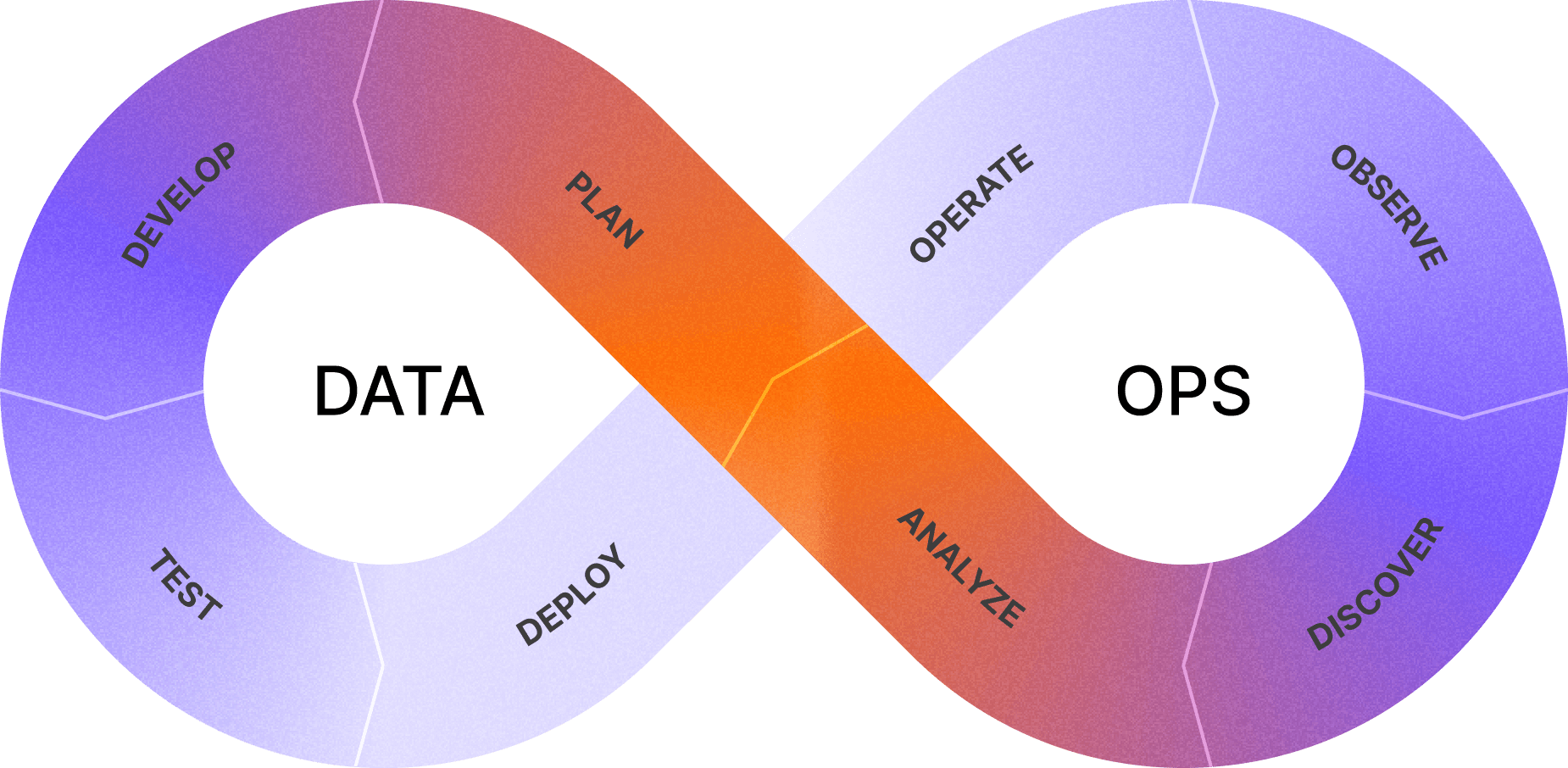
Diagram: dbt Labs' Analytics Development Lifecycle.
For this team, the loop begins with an agreed question. We find or design models, develop them in the development environment, test the result and review the change. A merge triggers deployment. Scheduled runs then use the same code on newer data, and their results inform the next investigation.
dbt supplies parts of that workflow; people still choose definitions, inspect results and respond to failures. The following chapters explain those responsibilities in the order you are likely to encounter them.
What changes in everyday work
Suppose a new analysis needs demographics and recent hospital activity. If suitable shared models exist, you can compose their results rather than repeat source cleaning and interpretation. A correction to one shared definition can then reach its consumers through their dependencies.
There is a cost to learning the workflow. The first setup and pull request take time. You also need to describe your model and show why its output is credible. That effort leaves something another person can inspect, reuse and maintain, including you when you return to it months later.
Tests and lineage make problems easier to detect, but they do not reveal every incorrect assumption. A model can run successfully and answer the wrong question. The handbook therefore teaches analytical judgement as well as the mechanics of using dbt.
The conventions belong to this project. dbt does not require our folder names, model prefixes or division of responsibilities. Next, Analysts and dbt explains how analysts, engineers and domain owners contribute to that shared work.
Quiz
0/2 answered1A SQL model in these examples is…
2How does dbt know which order to build models in?